Managing Agentic Flows with Pydantic Graph
📚 View all posts in the Graph-based Healthcare Series
Graph-based Healthcare Series — 3
This is the third post in an ongoing series on graph-based healthcare tools. Stay tuned for upcoming entries on clinical modeling, decision support systems, and graph-powered AI assistants.
In our previous post, we demonstrated how the IMNCI graph model could power a graph-based retrieval-augmented generation (graph RAG) pipeline. By combining structured clinical knowledge with large language models (LLMs), we laid the foundation for a system that supports real-world diagnostic workflows.
In this installment, we take that idea further by introducing agentic flows—a new phase in our clinical decision support pipeline. Here, an intelligent, dialogue-capable assistant doesn’t just answer queries; it actively guides the diagnostic process. This assistant leverages the structured IMNCI graph as its reasoning backbone and uses pydantic graph to statefully orchestrate a set of modular, task-specific assistants (tools).
Why Agentic Flows Are the Next Logical Step
Unlike retrieval-augmented systems that passively wait for clinician input, agentic flows drive the diagnostic interaction forward. They transform the system from a passive search engine into an active clinical reasoning partner.
For example:
- When multiple classifications are plausible, the agent suggests targeted questions that will eliminate uncertainty
- If a required lab test isn’t available, the agent adjusts its recommendations accordingly
- Throughout, the agent provides explanations to maintain transparency and build clinician trust
From Retrieval to Reasoning: Building Agentic Clinical Workflows
While graph RAG enables powerful, context-grounded retrieval, it is fundamentally reactive: the system responds only when prompted by a user. But real-world clinical reasoning is proactive and iterative, often requiring clarification, disambiguation, and step-by-step logic evaluation.
To meet this need, we’ve designed an agentic system—one that can:
- Understand the physician's intent at each critical step in the diagnosis process
- Track diagnostic context over the course of a session
- Select the next best action autonomously
- Interact with structured clinical graphs to dynamically advance the diagnostic flow
While several agent orchestration frameworks exist, we chose pydantic graph for its simplicity, Python-native modeling, and strong typing guarantees. However, the approach described here can also be implemented by libraries such as LangChain, AutoGen, or CrewAI.
The Diagnostic Agent: Intent-Aware and Action-Oriented
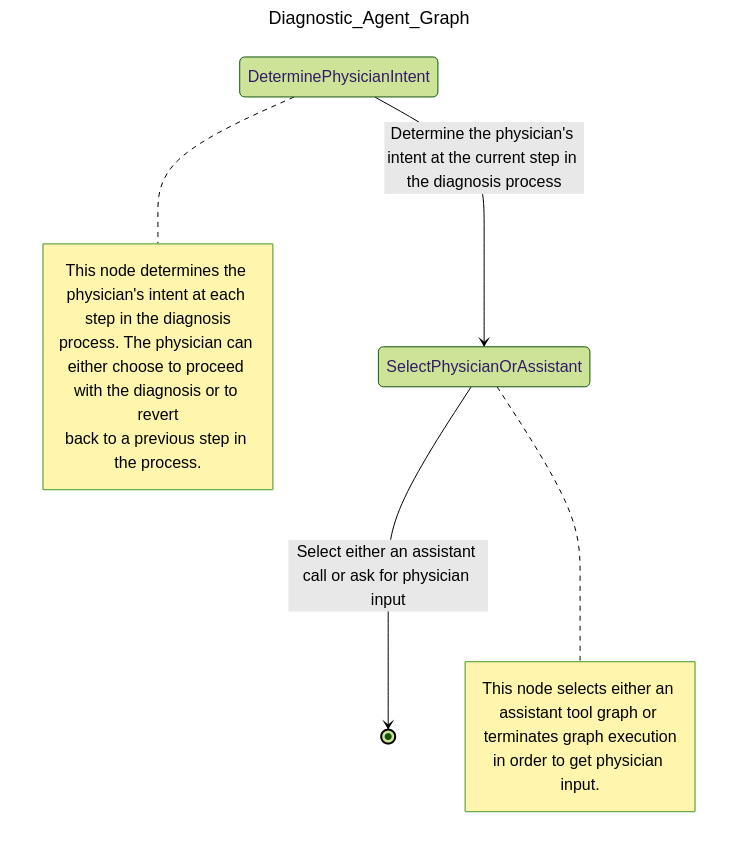
Our core design principle is straightforward: reduce the physician’s cognitive load, not increase it.
The AI assistant should streamline workflows—not complicate them. It doesn’t just answer questions—it collaborates by suggesting relevant questions, highlighting gaps, and proposing next steps grounded in clinical logic.
This means the agent must:
- Interpret clinician inputs to infer intent
- Maintain session context (e.g., symptoms observed, prior classifications retrieved)
- Decide on the most informative next step in the diagnostic process
If the physician interfaces with the patient, then the diagnostic agent interfaces with the physician, acting as a collaborative assistant that suggests relevant questions, highlights missing information, and proposes next actions based on graph logic and clinical reasoning.
Tool Use: Selecting the Right Assistant at the Right Time
Patient diagnosis is inherently dynamic. A single assistant cannot reliably handle the complexity of back-and-forth interactions between physician, patient, and data.
Instead, our architecture empowers the diagnostic agent to select from a suite of modular tools (assistants)—each purpose-built to perform a specific task in the diagnostic journey.
The key agentic behavior is tool selection: based on evolving session context, the agent dynamically decides whether to retrieve new information, refine prior results, or request clarification from the physician.
How Many Assistants Do We Need?
The assistants that defined below are just a starting point. The modular design allows for easy addition of new assistants as needed. For example, we could add an assistant for investigating related medical conditions, follow-up scheduling, or even patient education. The goal is to create a flexible toolkit that can adapt to the evolving needs of clinicians and patients alike.
The Assistants in Our Diagnostic Toolkit
Each assistant encapsulates a focused, reusable capability—designed to solve one part of the diagnostic process. Together, they form a flexible set of building blocks for interactive, logic-aware diagnostic reasoning.
🧠 Retrieve Classifications
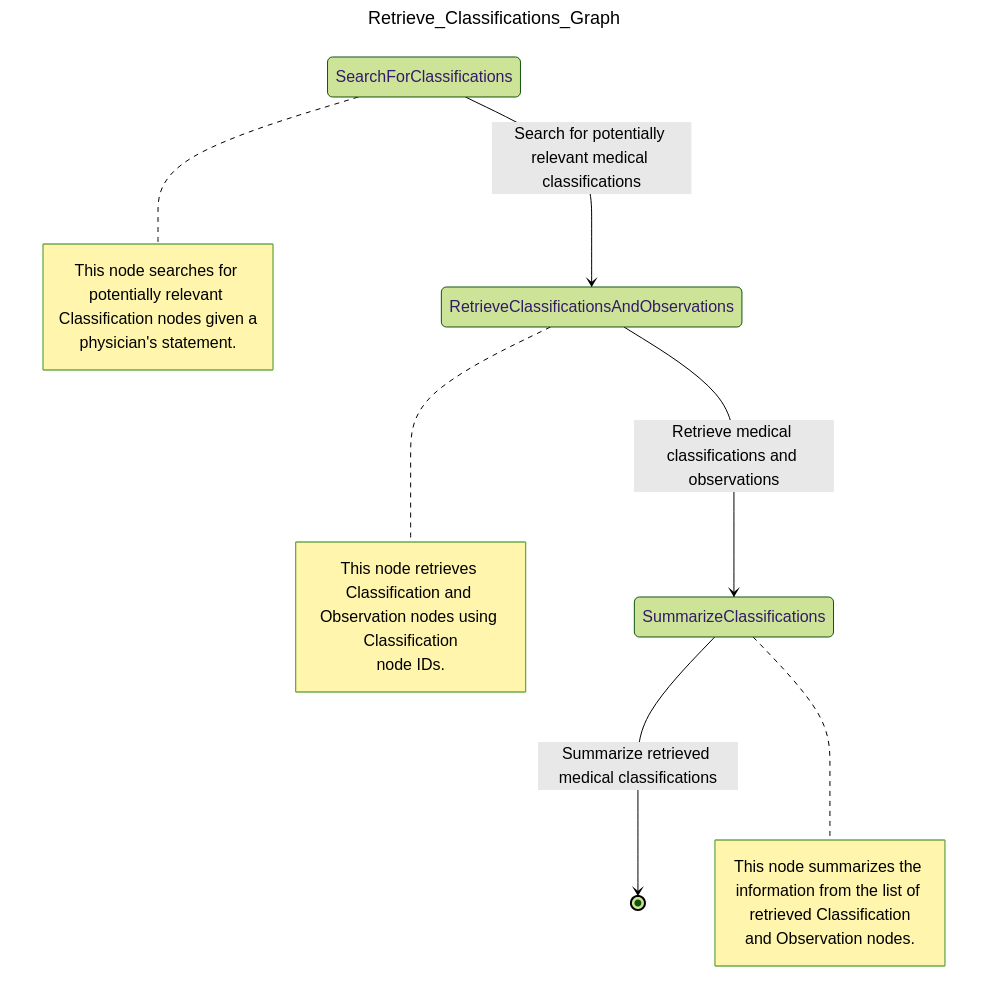
This assistant identifies candidate classifications for the current patient scenario:
- Queries the IMNCI graph for all relevant
Classificationnodes - Retrieves associated
Observationnodes and evaluates which ones are satisfied or missing based on patient input - Ranks classifications by degree of match and returns a detailed summary, including which observations are still needed to confirm each classification
This step forms the diagnostic "starting line"—a set of plausible explanations for the patient’s condition.
🔍 Refine Classifications
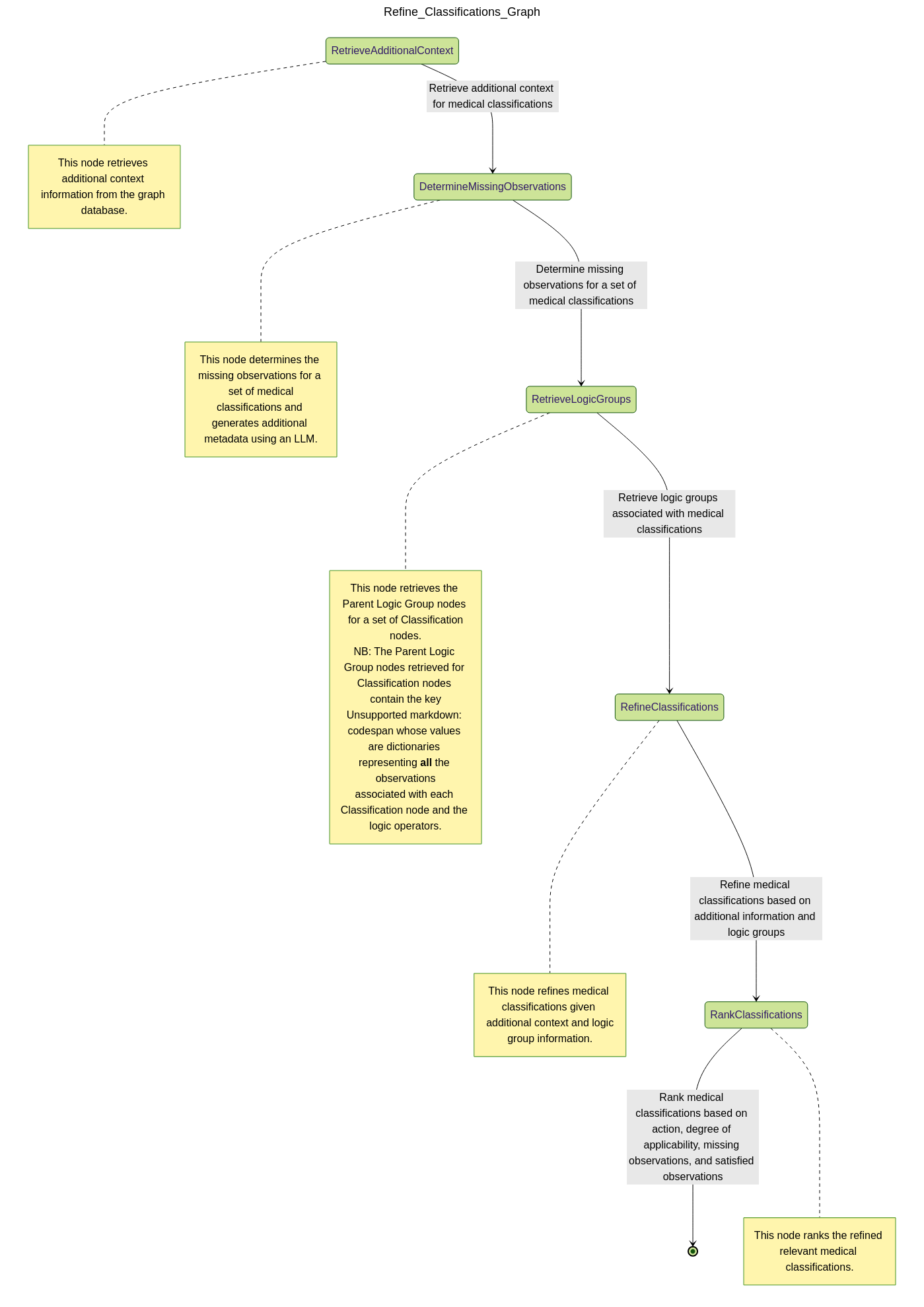
After reviewing candidate classifications, the physician may seek further clarification. This assistant enriches the retrieved set with additional context:
- Gathers supporting nodes from the IMNCI graph:
Footnotes,Critical Information,Procedures,Assessment Questions, etc. - Helps the physician decide which additional questions to ask or which physical exams to conduct
- Annotates each classification with actionable guidance for narrowing down options
The result is a more complete, clinically grounded profile of each classification—tailored to the patient’s specific presentation.
💊 Refine Treatments
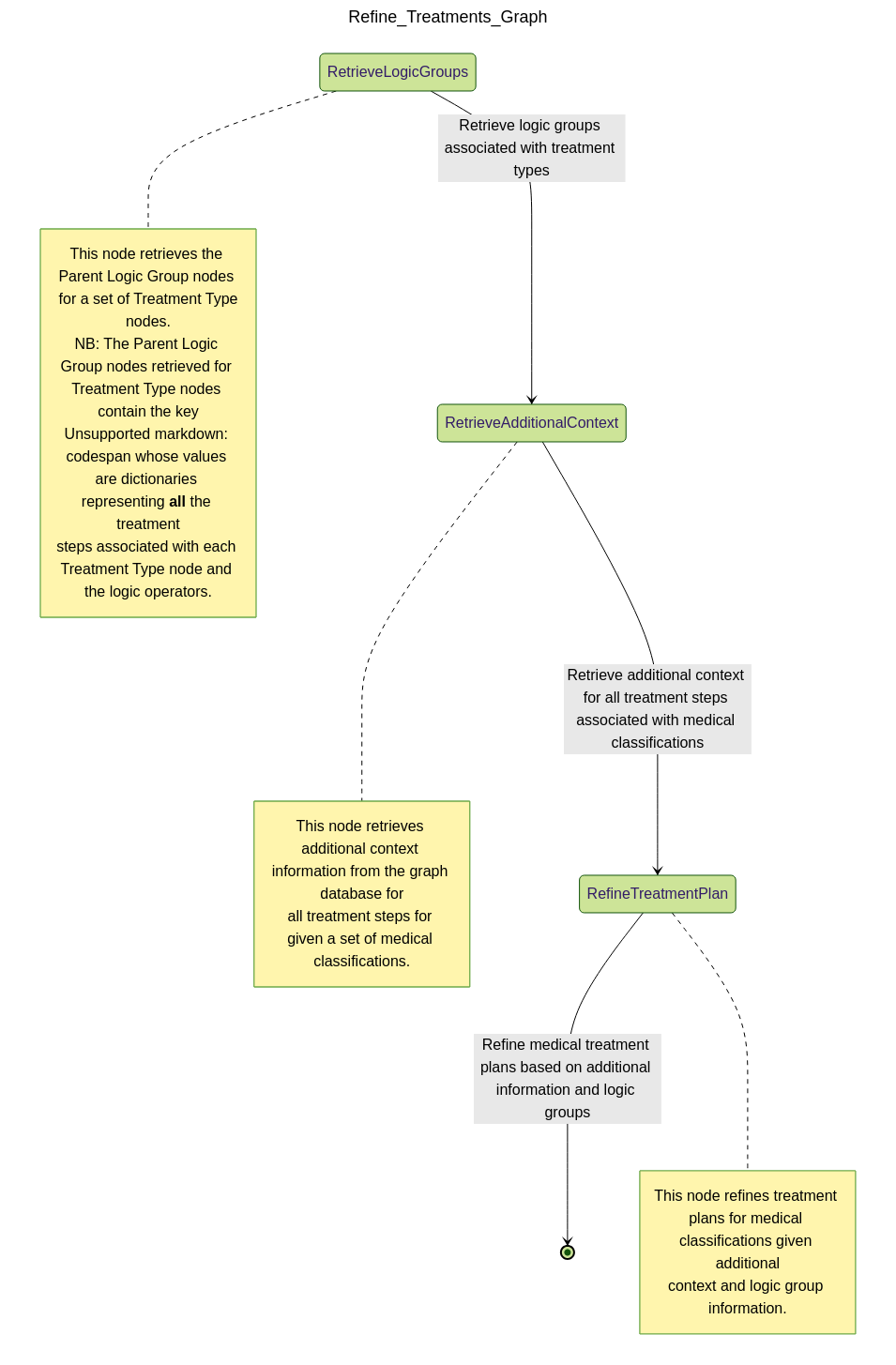
Once the most relevant classifications have been selected, this assistant surfaces recommended treatments:
- Retrieves associated
Treatment Stepnodes from the IMNCI graph - Ranks treatments by urgency and appropriateness based on the diagnostic context
- Highlights conditional logic—e.g., treatment steps that are optional or dependent on available resources
Thanks to the logical structure of our graph (using IF, AND, OR operators), this
assistant can also recommend safe simplifications or flag cases where more input is
needed before continuing treatment.
To illustrate how this all comes together, our next section walks through a detailed case study. We show how an agentic assistant automates a series of decisions to guide a diagnosis from ambiguous patient input to actionable treatment—highlighting key decision points along the way.
Case Study: Agentic Diagnosis of a 2-Month-Old Infant
To demonstrate the agentic flow in action, let’s walk through a realistic diagnostic scenario.
Step 1: Initial Classification Retrieval
A physician sends the following message:
Physician: "i have a patient exhibiting fast breathing, slightly underweight for their age (2 months), and appears to have receding eyes. i need help in understanding what are the possible classifications associated with these symptoms."
The diagnostic agent recognizes this as a request for initial differential diagnoses and invokes the Retrieve Classifications assistant, passing in the relevant patient observations.
The assistant queries the IMNCI graph, identifying partially matched classifications based on logic-linked observations. The results from the assistant is summarized by the diagnostic agent for the physician as follows:
Diagnostic Agent: "Here are potential classifications based on the current symptoms:
- Dehydration: e.g., Severe Dehydration, Some Dehydration
- Feeding Issues: e.g., Underweight/Feeding Problem – Breastfeeding and – Not Breastfeeding
- Respiratory Issues: e.g., Pneumonia, Very Severe Disease
- Gastrointestinal Conditions: e.g., Dysentery, Persistent Diarrhoea
To refine this, could you provide details on feeding history, fever, cough, diarrhea, or symptom duration?"
The full structured response (not shown here for brevity sake) includes associated logic matches, degrees of applicability, and unmet observations—enabling the physician to understand both what and why each classification was included.
Step 2: Refining Classifications with New Input
The physician responds:
Physician: "The patient isn’t coughing and hasn’t had any diarrhea. Let’s continue."
The agent interprets this update and calls the Refine Classifications assistant to re-evaluate the prior list. It filters out less likely paths (e.g., Dysentery, Persistent Diarrhoea) and uses the updated graph context to generate targeted follow-up.
The assistant returns a refined summary with prioritized classifications like:
- Pneumonia: Fast breathing present; confirmed age.
- Severe Dehydration: Sunken eyes confirmed; missing additional dehydration markers.
- Feeding Problem / Underweight: Underweight observed; more context needed (e.g., feeding method, suckling, thrush).
The full structured response (not shown here for brevity sake) also includes logic paths met or unmet, and grounded procedure steps and questions to help the physician collect missing data.
Step 3: Treatment Planning with Updated Observations
The physician follows up:
Physician: "Patient weight is now average, but skin pinch returns slowly and movement is limited. How should I treat?"
The diagnostic agent recognizes this as a pivot toward treatment and invokes the Refine Treatments assistant. This assistant evaluates the top-priority classifications (Pneumonia, Severe Dehydration, Feeding Issues) and returns tailored, actionable treatment steps, including:
-
Severe Dehydration:
- If other severe signs are present: urgent referral + ORS on the way
- If not: initiate Plan C fluid management
- Supportive care: frequent breastfeeding, keep infant warm
-
Feeding Problem / Underweight:
- Teach proper attachment and positioning
- Address thrush if present
- Advise exclusive breastfeeding or safe replacement feeding
- Plan follow-up (2 days for thrush, 14 days for weight)
-
Pneumonia:
- Administer amoxicillin for 7 days
- Educate on signs for urgent return
- Schedule a 2-day follow-up
All treatment recommendations are linked to IMNCI graph nodes, preserving full traceability. Where needed, clarifying questions/procedure steps are included and grounded in the IMNCI graph—for example:
"Does the infant only move when stimulated?" "Is the milk being prepared hygienically?" "Has the infant shown signs of thrush?"
Outcome
This three-step exchange highlights how agentic orchestration transforms passive querying into an interactive clinical reasoning workflow. At each stage:
- The agent interprets physician input and tracks evolving context
- Assistants selectively retrieve relevant classifications, refinements, or treatments
- Outputs are not just answers—but structured, explainable decisions with actionable next steps
At any point in the process, the physician retains full control over the session flow. They can choose to:
- Restart the diagnostic session,
- Revisit earlier decision points to revise observations or context,
- Iterate multiple times at any step, or
- Advance the session despite incomplete data—for example, when certain medical tools or tests are unavailable.
This flexible interaction loop enables a uniquely collaborative diagnostic experience where AI acts not as a rigid decision-maker but as an adaptive assistant that evolves with the clinician’s thought process.
The result is a collaborative diagnostic flow that’s transparent, adaptive, and grounded in verified clinical logic.
Want to see more?
If you want to see what the full results from a typical diagnostic session looks like, then come check it out!.
What's Next: Probabilistic Pattern Recognition and Reasoning
In this post, we demonstrated how agentic flows—powered by pydantic graph and structured clinical logic—can transform diagnosis from a reactive retrieval task into a guided, context-aware reasoning process. By orchestrating modular assistants, tracking physician intent, and dynamically adapting based on feedback, we've built a collaborative diagnostic experience that’s explainable, flexible, and clinically grounded.
But what happens when the static graph alone isn’t enough?
In real-world settings, clinicians often face ambiguous, incomplete, or noisy inputs. This is where probabilistic reasoning becomes useful and sometimes, essential.
In our next post, we’ll take a quick detour and explore how to simulate real world patient encounters by using LLMs to generate a pool of synthetic patient cases, each with unique symptoms and diagnoses. This will allow us to simulate a wide range of clinical scenarios and evaluate the performance of Bayesian pattern recognition methods in real-world applications.
Thanks for reading! If you're working on clinical AI, health informatics, or decision-making support, we'd love to hear from you!
⬅️ Previous: Enhancing Patient Diagnosis with Graph-based Retrieval Augmented Generation
➡️ Next up: Simulating Real World Pediatric Encounters Using Large Language Models